
October 21, 2026 · Latest release
Wisp 2.7
- Clip recording keeps going when the graphics card is busy, and clips stay in step with the game and its audio. Clips also record game audio on more PCs.
- Wisp keeps running when Windows restarts its desktop display, and the HUD restores its transparent overlay on its own.
- In circuit races started from the grid, the first lap is learned from the start line: the track map follows the car on that lap and the lap delta appears on the next lap.
- Update checks are more dependable on shared internet connections and during network outages.
October 7, 2026 · 3D lap review
Wisp 2.6.5
- Added an optional 3D lap map with recorded elevation, mouse rotation, pan and zoom. The 2D view remains available.
- Added Shared space to compare two laps side by side with the same color scale. Focus either lap or show both, and move their cursors together or independently.
- Added power and torque channels, a color legend, contact markers and Save PNG. Recorded object contacts and estimated possible contacts have distinct markers.
- Moved lap-position controls above the map and added map resizing and camera reset.
Explore lap review for the controls and comparison options.
Read the 2.6.5 release notes on GitHubOctober 2, 2026 · Clips, Tune and Lap review
Wisp 2.6
- Clips keeps a rolling recording of your drive. Choose 30 seconds to five minutes, up to 2160p at 60 fps, game or system audio, and optional lossless video on a supported NVIDIA encoder. Switching away pauses recording and keeps available footage ready to save. Set toggle and save shortcuts with optional sounds, watch clips in Wisp or export an MP4 with your own filename and folder.
- Tune reads the setup fitted to your car, including locked tunes. Current-car reading supports Steam and Xbox app / Microsoft Store FH6 with imperial game units. Save named setups, compare them with each other or the current car, and attach a checked copy to a recorded run. Deleting a saved tune keeps its run attachments.
- Lap review follows a recorded line and its inputs with one map and graph cursor. Automatic laps are grouped by day and car. Compare section times, braking, throttle and speed with Run B or a compatible pinned benchmark; choosing Run B takes priority.
Lap delta and the live track map remain available as separate beta overlays for circuit driving.
Read the 2.6 release notes on GitHubSeptember 26, 2026 · Time Attack fixes
Wisp 2.5.1
This update fixes lap delta in Time Attack and keeps your reference laps when Wisp restarts.
- Stopping for five seconds ends the attempt. Once two laps agree on the circuit, spending five seconds off it or going the wrong way ends it too. The panel shows START A LAP until you cross the start line again.
- Session best and previous lap survive a Wisp restart or update while Forza keeps running. Changing car or timing mode, leaving the circuit, or using Reset reference laps starts a new session.
- The reference lap time now appears beside SESSION BEST or PREVIOUS LAP.
- The lap delta panel and track map redraw only when their displayed content changes.
HUD profiles now also save particle, border and text colors, plus the drift gauge's visibility, size, dark mode and black background. Older profiles preserve these settings and your current lap delta settings when applied.
Read the 2.5.1 release notes on GitHubSeptember 26, 2026 · Circuit driving · Beta
Wisp 2.5
I've added lap delta and a live track map for circuit driving. Both are beta features. The delta compares your current lap with your session best or previous lap at the same place on the track. Negative means ahead; positive means behind.
- Race and Rivals laps use the game's lap clocks.
- Time Attack at Legend Island, Hokubu, Soni, and Sekibe uses start-line crossings and FH6's packet timestamp. Pauses add no lap time.
- Pauses and rewinds keep the lap and references. Resets, restarts, and abandoned Time Attack attempts start a fresh lap. Leaving the circuit clears the session.
- The live track map learns the circuit from the first full lap and follows the car.
Enable the beta in Appearance > Lap delta. More options contains the delta bar, live track map, sizes, and position settings. Colors are in Colors; Edit HUD layout moves either overlay. A one-time Dashboard banner introduces the features and can be closed.
Read the lap delta and live track map guide.
Read the 2.5 release notes on GitHubSeptember 23, 2026 · Performance hotfix
Wisp 2.4
Wisp 2.4 addresses the G-SYNC/VRR issue where the game stayed smooth but Wisp's needle looked slower while Forza had focus. I changed how the overlay is presented to Windows and separated needle updates from the rest of the HUD's drawing work.
- When the main HUD fits on one monitor, its presentation window covers that monitor. The artwork keeps its chosen size and position. Passive updates let Windows refresh Wisp's overlay windows alongside other desktop composition work.
- The hardware path gives the needle its own compositor visual and worker. Fresh RPM data reaches it directly, without waiting for the UI to publish a HUD snapshot.
- Live RPM playback starts with a 20 ms minimum buffer and can adapt up to 75 ms. Rendering reuses needle pixels and command buffers, avoids repeated wakeups from tiny waits, and handles frame readiness, hidden windows, and shutdown more consistently.
- Supplementary-gauge playback now accounts for when queued samples are read, preserving timing after a delayed update. Debug exports include the exact build, rendering path, needle input, and presentation timings.
Thanks to fredemmott for sharing guidance from Microsoft's Direct3D team. It helped me investigate how transparent overlays work with variable refresh rate.
Update, then keep the main HUD inside one monitor to use the new presentation host. See Help for rendering settings and what to include in a report if the needle still looks uneven.
Read the full 2.4 changes and investigation on GitHubHotfix and optional beta shift guidance
Wisp 2.3.4
This hotfix addresses the app accent-color crash, supplementary-gauge attachment and update recovery. It also includes optional shift guidance, marked BETA and off by default.
- Changing the app accent color while another tab is open no longer crashes Wisp. The dashboard oval returns in the selected color when you switch back.
- Power and torque gauges stay separate in Minimal, Combined, Box and Native Digital. Attachment preferences are preserved for Native Analogue. Boost and tire-temperature gauges are included in Appearance previews.
- If an update cannot start, Wisp stays open and shows repair instructions. The installer asks you to exit a running Wisp copy before installation. Settings, profiles, tire calibration and saved runs carry over.
Shift guidance beta
Calibrate each supported combustion car and tune with a rolling full-throttle pull and a confirming upshift. Wisp compares measured output in adjacent gears and shows configurable green, yellow and flashing red stages around the gear number. Missing RPM coverage or a changed configuration requires calibration before guidance is available.
The beta currently supports combustion cars on Forza Horizon 6 Steam build 6.440.853.0. Red marks a calibrated full-load RPM target. Use the guidance alongside your experience of the car's grip and shift recovery.
Read the 2.3.4 release notes on GitHubDrift mode for power and torque
Wisp 2.3
Optional Drift mode keeps the power and torque numbers and needles at their last positive reading during brief redline power cuts. The numbers flash in your chosen color to show the cut instead of repeatedly dropping to zero.
- Drift mode is off by default. Enable it in Appearance > Gauges > Engine output > More options.
- Choose Drift cut flash in Appearance > Colors. Set the flash frequency beside Drift mode to control how often it pulses. The flash changes the number color while keeping its opacity and the held needle position.
- Releasing the accelerator or leaving a brief cut returns the gauges to live readings. Signed output and EV regeneration keep their existing behavior. Recorded telemetry and peak readings are unchanged.
- Drift mode, flash color, and flash frequency save with HUD profiles. Existing settings, gauge positions, tire calibration, and recorded runs carry over.
Gauge rendering and EV layout
Wisp 2.2
EV, boost, tire-temperature, power, torque, and G-force gauges now use the same native rendering path as the speedometer. This addresses uneven needle and G-force movement while retaining the existing gauge artwork and color options.
- Attached EV gauges use a smaller, compact layout around the speedometer: tire temperature above power and torque on the right, with G-force above the dial. Individual size controls still apply.
- Appearance previews use the same EV placement as the HUD and show every enabled gauge, including detached gauges. Detaching a gauge no longer removes it from the preview.
- Install over your existing version. Saved settings, HUD profiles, detached positions, tire calibration, and recorded runs carry over.
Gauge alignment and sizing
Wisp 2.1.1
Boost, tire-temperature, power, and torque dials now match at 100%. Their row and column centers stay aligned when individual sizes differ, and the Analogue preview uses the same supplementary gauge layout as the HUD.
- Power and torque have separate size sliders in Appearance > Gauges > Engine output. Boost and tire-temperature sizes apply while attached to the speedometer as well as detached.
- G-force meter sizing ranges from 50% to 200% in Appearance > Gauges. It applies to attached, detached, and Combined layouts and their previews.
- Saved sizes, HUD profiles, detached positions, tire calibration, and runs carry over. The previous shared power and torque size becomes the initial value for both sliders.
Power and torque gauges
Wisp 2.1
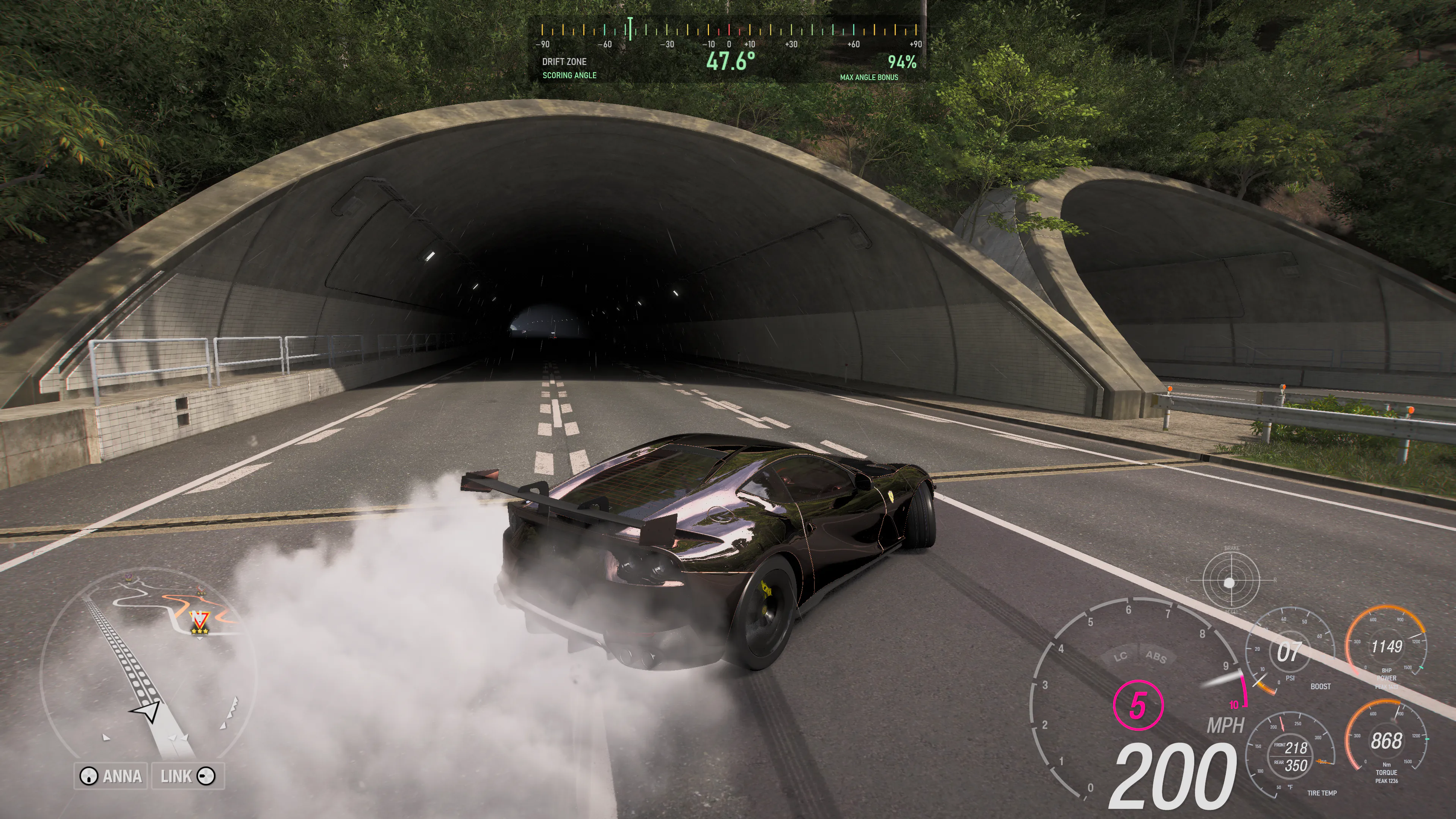
Live power and torque gauges join the HUD, with separate placement, peak readings, and fixed ranges for each car. Enable either gauge in Appearance > Gauges. Power reads in BHP; torque follows your Nm or lb-ft preference.
Set a range that fits the car
More options contains fixed scale limits saved separately for each car. Set from this run applies the highest readings observed so far plus 10% to both ranges once. Later readings do not move the scale. Before a car is detected, the controls set defaults for cars without a saved range. Numbers can show output beyond the selected range even when the needle reaches its end.
Peak markers and numbers track the current car since the last reset. Reset peaks clears them, and changing cars starts fresh. After retuning, reset peaks and make a full-throttle pull before setting the range again. These are observed peaks from the game's telemetry, not rated engine or tune limits.
Placement, colors, and smoothing
- Attach each gauge to the speedometer or detach and move it in Edit HUD layout. Power and torque remember their positions separately.
- Gauge start, Gauge middle, and Gauge end in Appearance > Colors apply across boost, tire temperature, power, and torque. Power and torque each have an optional matching number color.
- Gauge smoothing under More options ranges from 0 to 1500 ms, with a 250 ms default. Numeric readings update less often than the needles to keep them readable.
- Negative output is hidden by default. Show negative power and torque enables it on the gauges; recorded telemetry retains the original signed values.
Defaults and existing settings
Fresh installations start with Native Analogue and all gauges enabled. The four supplementary dials match in size. Existing installations keep their saved choices, and profiles preserve visibility, attachment, smoothing, colors, size, and the selected ranges. Install over your existing version to retain settings, profiles, tire calibration, and recorded runs. The 2.0.1 interface fixes and optional tour are included.
Read the 2.1 release notes on GitHubQuick tour and interface fixes
Wisp 2.0.1
An optional tour introduces the Wisp 2.0 interface. This update also addresses recurring interface pauses, uneven particle animation, and the clipped top-speed label after leaving Display mode.
A quick way to find your bearings
The welcome banner offers a four-step tour: the drift gauge, Dashboard and Display mode, Runs, then Appearance and colors. Skip or dismiss it at any time. To see it again, open Release Notes in Wisp and replay the tour. Automatic game-triggered launches are not interrupted by the banner.
Interface fixes
- Game-detection scans run away from the interface thread, removing the recurring pause caused by scanning unrelated windows when the standard Forza process is not found.
- Background and dashboard-rim particles handle small timing variations without skipping alternating animation updates. The animation work limit remains in place.
- The dashboard keeps the top-speed label inside its oval at wide window sizes, including after returning from Display mode.
Install over your existing version. Your HUDs, settings, profiles, tire calibration, and recorded runs carry over. These fixes address specific measured defects; performance still depends on the computer and workload.
Read the 2.0.1 release notes on GitHubNew in Wisp 2.0
Wisp 2.0
Dashboard and Display mode
The new dashboard puts a curved tachometer, speed, gear, power, torque, and session peaks together. Display mode makes it a borderless second-screen dashboard, either filling the monitor or resized to share it. F11 switches modes from Dashboard; Escape exits. Driver assists distinguish Disabled, Enabled, and Active.
Drift angle guidance
Add the drift gauge in Appearance > Gauges. Drift Zone guidance uses the verified Steam FH6 6.440.853.0 angle-bonus profile: its scoring-angle range starts at 10 degrees and the angle bonus reaches its maximum at 59.4 degrees. A 20–40 degree drift already corresponds to roughly 80–90% of the maximum angle bonus. Use that percentage alongside your speed, line, and the score shown by FH6. Custom target guidance is available on other builds, including Xbox app / Microsoft Store PC. Dark shading and an optional black background with adjustable opacity keep the gauge readable. Both modes hide the angle, marker, and bonus below 5 mph ground speed (about 8 km/h), avoiding misleading angles while stationary on a slope or spinning the wheels.
Runs, saved edits, and sharing
Runs groups graphs into Overview, Engine, and Tires & handling. Show, hide, reorder, and resize graph modules, compare runs overlaid or side by side, and read statistics as cards or a table. Switching Run A keeps the graph workspace open. Import runs accepts multiple .wisprun files and library ZIPs; Export all backs up your library; Delete all offers confirmation and Undo. Existing report images, CSV, markers, names, and notes remain.
Search saved runs by name or tune label. Names, tune labels, and notes save automatically and are preserved when switching runs. A Saving… / Saved indicator shows progress, with Retry if saving fails. The selected run's Export menu brings .wisprun and CSV exports together.
Appearance and connection help
Click the connection status to check whether Forza is detected, telemetry is arriving, and the overlay is enabled or hidden, with the relevant next step.
Appearance adds application border, glow, surface opacity, rounding, spacing, and text controls alongside a larger HUD preview. Optional particles follow your accent or a separate color, without mouse interaction or changing the selected background. Pause or hide them independently. G-force dot and trail colors are separate, and the meter can be disabled in every layout. The previous interface remains available after a restart.
Interface fixes and updating
Corrects RPM ticks, clipped Display controls, card outlines, disabled library styling, graph customization clipping, and nested scrolling. Fresh installs use the wizard's palette; updates keep existing colors, settings, calibration, profiles, and runs. Native HUD artwork, needle behavior, the Analogue renderer, and optional CPU mode are retained.
Read the 2.0 release notes on GitHub Drift gauge setup and angle guidance Runs walkthroughHUD positioning
Wisp 1.2.2
Keeps the main Native HUD stationary when its attached G-force meter is toggled and services the bundled .NET runtime.
Read the 1.2.2 release notesAnalogue tachometer rendering
Wisp 1.2.1
Adds optional CPU rendering for PCs that experience Analogue tachometer lag or hitching. Enable CPU rendering in Diagnostics, choose Exit Wisp from the tray menu, then reopen Wisp. GPU rendering remains the default. CPU mode can increase CPU usage, and Windows still uses the GPU to compose the overlay. Other gauges keep their existing renderers.
CPU mode reuses the unchanged dial background to reduce repeated drawing work while the needle and live readings continue updating. The gauge artwork and needle smoothing are preserved. This update also prevents queued telemetry from falsely resetting needle playback and avoids redrawing the same HUD while Windows is busy accepting a frame.
Local debug exports now include the active rendering mode and detailed frame-wait, drawing, and presentation timings to help investigate hitching. Install over your current version to keep HUD settings, profiles, tire calibration, and saved runs. Record Run and Compare Runs remain available.
How to try CPU renderingRecord Run and Compare Runs
Wisp 1.2
Record a launch, drift section, or tuning test, then review the drive in Wisp. The Runs page puts the summary first, with readable stats and explanations of what changed during the run. Show graphs opens eight visible choices: speed, driver inputs, engine, power and torque against RPM, G-force over time, a G-force plot, tire temperatures, and tire-temperature change.
Compare two saved runs with distinct colors and line styles. Follow both at the same elapsed time, or match a completed acceleration speed range in each run. Select a shorter section to examine, move the cursor for shared readings, and jump back to moments you marked while driving. Missing data stays visible, and unavailable measurements are called out in the report.
Recording options include a 3-, 5-, or 10-second countdown, timed stops from 30 seconds to 10 minutes, and optional keyboard shortcuts for recording and markers. Manual recordings also stop at 10 minutes. Rename saved runs, add notes about the tune or conditions, and export a graph image, telemetry CSV, or a .wisprun file that can be imported for another comparison. Recordings and analysis stay on your PC until you choose to share them.
Acceleration times are estimated from the recorded telemetry. Use repeatable routes and conditions when comparing results, and keep tune settings in each run's notes.
How to record and compare a runAnalogue tachometer
Wisp 1.1.4
Addresses choppy Analogue tachometer motion while Forza has focus. The live combustion Analogue HUD uses a dedicated renderer while keeping the original gauge artwork, native needle angle and blur, and existing playback timing. Motion blur is also corrected when the tachometer uses RPM because native needle data is unavailable.
Also fixes the Analogue tach freezing in the wrong position or clipping the speed readout after toggling the attached G-force meter.
Digital and electric HUDs and Appearance previews keep their existing renderer and settings. Local debug exports include needle-source and render-submission timing to help investigate remaining smoothness reports.
Read the 1.1.4 release notesStore compatibility and boost gauges
Wisp 1.1.3
Adds Native HUD support for Xbox app / Microsoft Store FH6 3.440.853.0 on Windows PC, and optional vacuum pressure for boost gauges. Enabled boost gauges show a stationary zero for naturally aspirated cars and remain hidden for electric vehicles. With automatic update checks enabled, Wisp checks whenever it opens and every 24 hours while it remains running. Previous compatibility maps remain available offline.
Read the 1.1.3 release notesForza compatibility
Wisp 1.1.2
Restores Native HUD support for Steam FH6 6.440.853.0. Signed compatibility maps can now deliver support for future reviewed game builds without reinstalling Wisp, while accepted maps remain available offline. Some future game changes will still require an application update.
Read the 1.1.2 release notesSteam and Microsoft Store
Wisp 1.1.1
Native HUD support now includes the Xbox app and Microsoft Store editions of Forza Horizon 6 on Windows PC, alongside Steam. Both use the same local Data Out setup. HUD layouts, profiles, colors, and tire calibration stay intact.
Read the 1.1.1 release notesMore readable wheel speed
Wisp 1.1
Adjustable wheel-speed smoothing makes the readout easier to follow while drifting. Profile and calibration saves are more reliable, connection timing is independent of Windows clock changes, and setup has a refreshed particle background.
Read the 1.1 release notesClearer diagnostics
Wisp 1.0.12
Local diagnostic reports connect telemetry, UI processing, native HUD data, and rendering measurements with timestamps and practical next steps. Logging stays optional and local. Native HUD recovery after race settings transitions is improved.
Read the 1.0.12 release notesYour HUD, your setup
Wisp 1.0.10
Save named HUD profiles, customize colors, and switch torque units. Track session top speed, peak power, and peak torque. This release also adds a customizable visibility hotkey, update notifications, in-app release notes, and exportable debug logs.
Read the 1.0.10 release notes